The scene box is the part of the flow that most rewards learning, and the part people treat most casually. It is not a prompt field. It is a script, and it is read by something that has to decide, frame by frame, who is on screen, whose mouth moves, and what the audio does.
Tag every spoken line
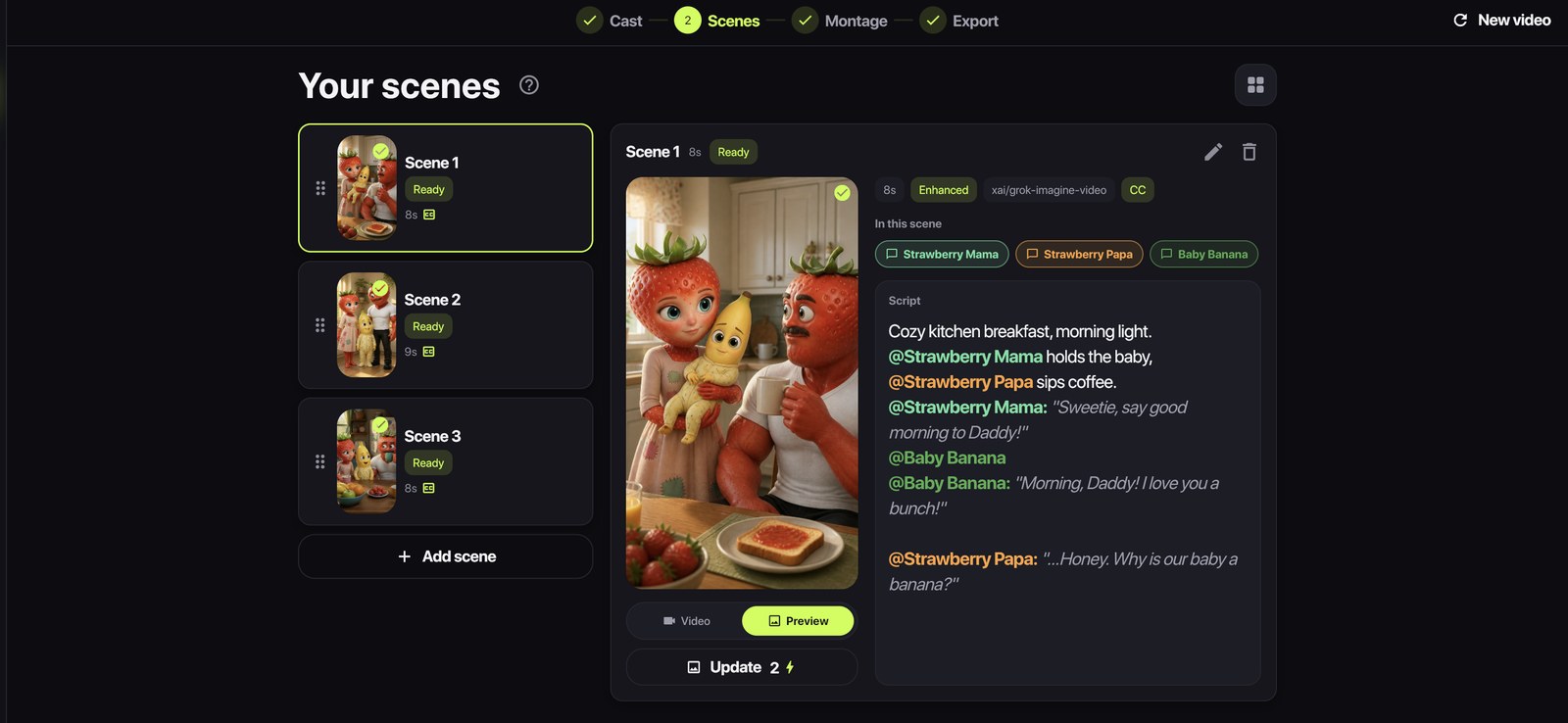
A line that begins with @Name belongs to that character. This is not decoration - the tag is what binds the line to a reference image, so the character who says it is the character whose lips move.
Cozy kitchen, morning light. @Strawberry Mama holds the baby, @Strawberry Papa sips coffee. @Strawberry Mama: "Sweetie, say good morning to Daddy!"
Note the two kinds of mention in that example. A bare @Name in a stage direction places a character in the shot. A @Name followed by a colon and a quoted line makes them speak it. Both are useful; only the second one moves a mouth.
Use @Voiceover for anything nobody says on camera
Narration is a different thing from dialogue and has to be marked as such, or you get a character mouthing your voiceover:
@Voiceover: "Three days earlier."
Lines tagged @Voiceover are treated as off-screen narration. Nobody on screen speaks them, and nobody lip-syncs them - the mouths stay shut while the narrator talks.
Put delivery in brackets, not in adjectives
Video models do respond to a delivery note, and the most reliable place for one is right next to the line it applies to:
@Baby Banana: "I love you a bunch!" (delighted, slightly too loud)
That works better than describing the mood in the scene text and hoping it lands on the right line. Keep it short. Two or three words of direction beat a sentence of psychology, because the model is choosing a tone of voice, not building a character study.
Short lines, short scenes
The single most common scripting mistake is writing a paragraph where a line belongs. A long speech in a generated clip does three things, all bad: it forces a long scene, long scenes wander, and lip-sync has more time to drift out of step.
- One idea per scene. If a scene has a setup and a punchline, that is two scenes.
- Six to twelve words per spoken line is a good working range.
- Two speakers per scene, three at most. A crowd scene is a still, not a dialogue.
- Let scene length stay on Auto - it follows the length of the dialogue rather than a number you guessed.
Write the shot, not the vibe
The description part of a scene is doing camera work. "Cozy kitchen counter at night, two fruits sit apart" is a shot. "Emotional moment between them" is not - it gives the model nothing to place, and it will place something anyway.
Concrete beats evocative every time here: the room, the light, where the characters are relative to each other, what they are doing with their hands. That is what a frame is made of.
Read the still before you buy the clip
Once a scene reads well, make a still preview of it. This is the cheapest edit you will ever make: a still costs a couple of tokens and tells you immediately whether the model read your script the way you meant it. If the framing is wrong, the fix is usually one word in the description - and it is far better to find that out from a still than from a rendered clip.
The still also gets handed to the video model as the reference for the shot, so approving it is not just a check. It is how you pin the composition down before anything moves.