Scene three is wrong. The line is fine, the framing is fine, but the character does something odd with her hands at the end and now that is the only thing you can see. In most tools the answer is to generate the video again, pay for all of it, and hope the new roll is better everywhere else too.
It should not work like that, and here it does not. Generation is per scene, so a bad clip is a bad clip - not a bad video.
A take is a version of one scene
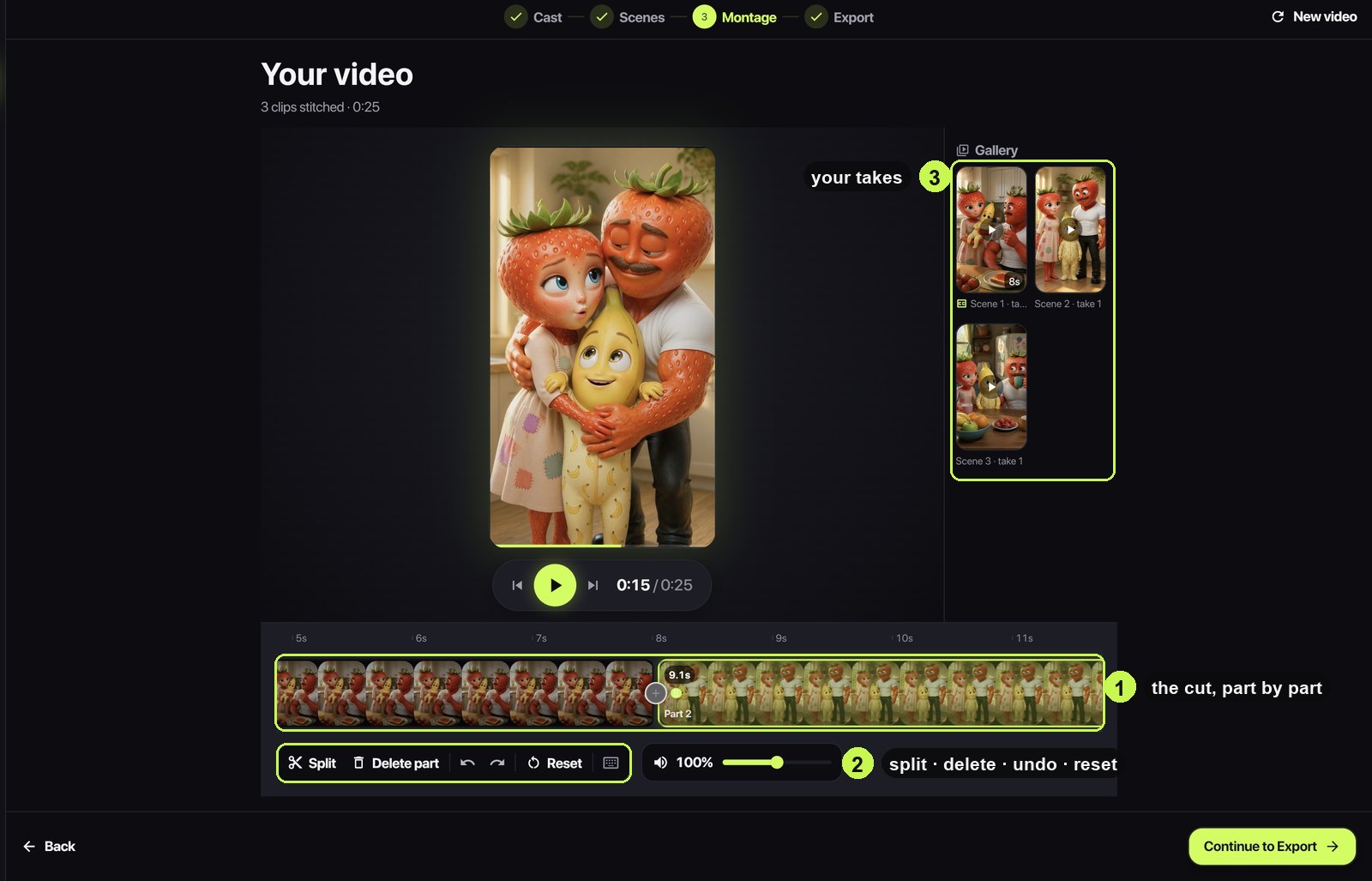
Every time a scene renders, the result is stored as a take. Re-roll it and you get take two; the first one is not deleted, it is archived. That archive is the gallery on the Montage step, and it holds every generation the project has ever made, labelled by scene and take number.
So there are two different ways to fix a clip, and only one of them costs anything:
- Re-roll the scene - a new generation, billed at that scene's price. Use it when the clip is wrong and you want another attempt.
- Swap in an existing take - drag it from the gallery onto the timeline. Free, instant, and the way back from a re-roll you regret.
Picking a take up
On the timeline, a take is picked up by pressing anywhere on its tile in the gallery and dragging. The tile squeezes under your finger to say it has been grabbed, and after a moment you can drag it in any direction - including sideways along the shelf, which used to be the direction that only scrolled the list. A plain tap still opens the take so you can watch it full size before committing.
Dropped on the timeline, the take becomes a part of the cut at that position. The parts around it slide to make room, and nothing is re-rendered - the timeline is a list of ranges over files that already exist, which is why this is instant.
The cut is free, so cut properly
Since editing costs nothing, the montage step is where a video stops being a stack of clips and becomes something with a rhythm. The tools are the boring ones on purpose:
- Split a part where the beat changes, then delete the half that drags.
- Trim either end. Generated clips very often have half a second of nothing at the start - that half second is the difference between a snappy cut and a slow one.
- Reorder parts by dragging. Reaction shots frequently work better one position later than you wrote them.
- Undo and redo all the way back, and Reset to rebuild the timeline from the scenes if you have tangled it.
What re-rolling cannot fix
If two consecutive re-rolls of the same scene both come back wrong in the same way, the problem is upstream - the script, not the dice. A model that keeps putting your character in the wrong place is usually being told to, by a description that reads as ambiguous once you look at it coldly.
The cheap diagnostic is a still preview. Generate the still, look at the framing, and rewrite the description rather than the seed. It costs a couple of tokens instead of another clip, and it fixes the class of the problem rather than one instance of it.
A workflow that keeps the bill honest
Put together, the sequence that wastes the least is: write scenes, still-preview the ones you are unsure about, generate, then do the whole first pass of fixes in the montage - trims, order, take swaps - and only re-roll what editing cannot save. Most of what feels wrong on first watch is timing, and timing is free.